
How We Built Per-Section Applause with Claude Code (a.k.a. Medium Clone)
 Karol Binkowski•Apr 21, 2026•11 min read
TL;DR: I built a per-section applause feature for the Agentic Engineering guide, inspired by the feature on Medium. I used Claude Code for the implementation and research. I utilized the new sendBeacon API and created a Remark plugin that traverses the Markdown syntax tree (AST) to automatically inject components (~60 components throughout the guide). See how we automated component injection and leveraged the new browser API to reduce the number of requests.
Why the applause function?
The Agentic Engineering Guide is our product designed to introduce not only our devs but also all the React Native devs out there to the use of agent-based systems in software development and beyond. It is agnostic regarding current technologies, ensuring it remains timeless and universal. It is popular, especially since this is the direction we are heading as engineers, and our role is slowly transforming into that of a conductor or architect, while we delegate implementation tasks to agent systems such as Claude Code.
Given the need for analytics and feedback on our guide – specifically, which sections users like and which they find less appealing – I was tasked with implementing an applause feature. A similar feature can be found on Medium, a blogging platform most engineers are already familiar with.
The requirements were straightforward: self-hosted (we don't outsource infrastructure for things we own), simple enough to not involve the DevOps team, easy to query for analytics, and abuse-resistant. Traffic was ~1800 GA events per month – nothing that needed to scale aggressively. The part I didn't expect? A browser API I'd never used in production ended up being the most interesting decision.
Where to start?
My initial thought was that I had no idea—or too many ideas. We were inspired by Josh Comeau’s blog and his “heart button.” Specifically, I had it in mind that this could be done using SQL, MongoDB, or Redis. And in the cloud, and self-hosted, and on Hono, and on XYZ… All of this led to me having no idea what to choose or what would be best, because there were plenty of options and just as many requirements. On top of that, I didn’t want to significantly involve the DevOps team in the process.
Because there are so many options, I asked my friend Claude:
I’d like to implement a clapping feature on our website similar to the one on Medium. Users can clap a piece of content up to 50 times. The entire process works without requiring users to log in. If there’s already a ready-made solution, I’d use it. We need to be smart enough to prevent bot attacks. The goal of introducing clapping is to observe which content is more useful, easier to read, more engaging, worth reading, etc., which will be helpful in creating future content. The site is currently hosted on GitHub Pages. Monthly traffic on this site is low: about 1,800 GA events per month. (First prompt — laying out the whole brief: Medium-style claps, no login, bot-resistance, analytics goal, ~1800 monthly GA events on GitHub Pages)
I really wanted to find a ready-made solution because I hate reinventing the wheel. So Claude pointed me toward something called the applause-button. It was a ready-made solution with an API – all I had to do was install the package and start using it.
However, we want to track applause per section. Feedback in the form of applause per page wasn’t valuable enough for us. We want to discuss each idea within the context of a broader topic where we post our ideas and write about them. We don’t have control over that, because after all, what if someone spams us? However, this suggestion turned out to be useful for later implementation. I knew we needed something “ours,” so I pivoted:
I would like to implement the applause function on the frontend based on the contract. We want to have applause per article (page) and per section (second-level heading ##); perhaps it would be better to do this manually as an MDX component to have better control over it. When the page is loaded, a GET request should be sent to the endpoint /claps&slug=slugified-article-or-heading-name; then, the added count should be stored in the component, and when the page is closed, a sendBeacon POST request should be sent to /claps&slug=... with the number of claps. The maximum number of claps will be 16 for now and should be hardcoded. The button should be satisfying to use and encourage users to click on it. The maximum number of clicks can also be hardcoded in the endpoint that returns it, to ensure consistency across the site.
(Frontend spec: per-article + per-section claps, MDX component, GET on load, sendBeacon POST on page close, max 16 claps as constant)
As you can see, I clearly told the agent what to do, and that’s the key to effective agentic engineering. Without precision, and by telling things like “fix it” or “write it however you see fit,” we won’t arrive at sensible solutions, or it will cost us more tokens.
Instead of just coding, we should at least have a high-level understanding of what we want to do and how we want to do it. Let’s leave the details to the agent, our implementation specialist, and check the code line by line before committing, making sure it complies with the repository standards and that we actually understand the code (yes, we take responsibility for it).
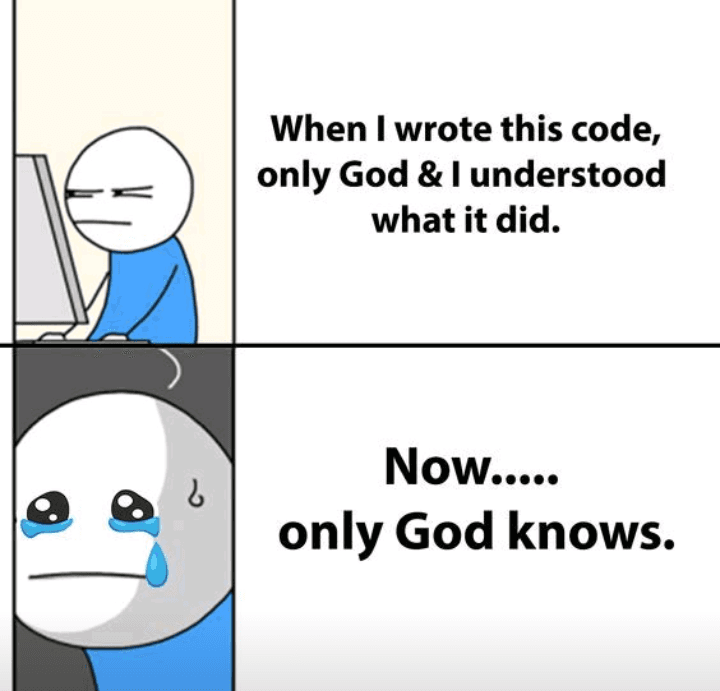
What I personally do is always (and I mean always) review my code to make sure I’ll still understand what it does six months from now when I come back to it. To achieve this, I refactor it in a way that’s clear to me and others. For example, by refactoring Booleans into variables with domain-specific, meaningful names. I want to make sure that in six months, not only God but also I will know what my code does.
The agent proposed the contract first:
GET  /claps?slug={slug}   →  { count, max_claps, user_claps }
POST /claps?slug={slug}      body: { claps: number }
We added max_claps to the GET response so that the applause is defined only on the server side, without duplicating it on the client. We used the same approach for error codes to avoid having to translate everything on both sides in the future.
Contract before code (METHOD: What, Why, and How)
We are the architects: notice how I defined and translated my implementation idea into a prompt. I specified what the agent should write (WHAT), why we want it (WHY), and how/under what contract (HOW). I also gave it a few tips on what it might do wrong or where my vision and the agent’s might diverge in different directions.
The first prompt should be general enough so that the basic framework of what we want to do remains unchanged. Subsequent prompts, in the form of a conversation, then serve as additional refinements and the polishing of the diamond. If we can and have something in mind regarding the implementation, let’s include it in the first prompt.
Implementation
IP addresses
One thing that required particular attention when storing data was the hashing of IP addresses. IP addresses are PII (Personally Identifiable Information), and we want to ensure that they are stored as encrypted fields.
Append-only event log
Every POST is an INSERT into an append-only event log. No UPDATE, no upsert. The total is always SUM(claps) – computed, never stored.
This pattern is common in systems where you need to analyze actions over time. Inserts scale better than updates – writes are stateless, with no need to read the current value before modifying it. The practical upside: if we detect abuse, we can remove events from a specific IP and timeframe without a schema migration.
Indexes
When we ask the agent to scan the code for specific queries, we’ll be able to set up the perfect indexes for all the necessary fields in our database. It’s a small thing, but it’s worth doing to speed up database searches:
CREATE INDEX idx_clap_events_slug    ON clap_events(slug, claps);
CREATE INDEX idx_clap_events_slug_ip ON clap_events(slug, ip_hash, claps);
Automating ~60 buttons with a remark plugin
My first instinct was to place the buttons manually to gain more control, and make them more straightforward. Then I counted: 60 buttons across 17 articles, each with a slug I'd have to get right by hand. One typo and the analytics are silently broken. That's when I reached for a remark plugin instead.
const text = toString(node);
const sectionSlug = slugger.slug(text);
const slug = `${articleSlug}/${sectionSlug}`;
sendBeacon: one request per session, offline-first
While everyone else implements something similar with a high debounce (~800 ms), meaning the browser sends a request with the claps only 800 ms after the user stops clapping, I had a different idea.
To reduce the number of requests, ensure greater security and reliability (even if someone has a slow internet connection) we used the new Navigator: sendBeacon(). It is used to send analytics requests, for example, when the browser tab is closed. This ensures that the request will be sent even after the tab is closed, even if the user has slow internet connection.
This also provides an extra layer of security, since requests related to applause aren’t visible in the Network tab of DevTools, which helps keep our contract hidden.
DISCLAIMER: Ad blockers do NOT block navigator.sendBeacon unless we’re on their blacklist.
sendBeacon | Debounce | |
|---|---|---|
| Requests per session | 1 | N |
| Fires after page close | ✅ | ❌ |
| Survives network interruption | ✅ | ❌ |
| Visible in Network tab | ❌ | ✅ |
| Easy to debug | ❌ | ✅ |
The only case debounce handles better is "clicked and closed the tab within 800ms." On a documentation site, that's a tradeoff we'll take.
Debugging moment
There came a moment when things didn't go the way I or my agent had planned. It wasn't working.
GET works, but POST doesn't – it still shows 0 when I close the tab (Partial fix: GET works but sendBeacon POST still silently drops data on tab close)
My first guess was that the endpoint itself was broken – I spent a good while checking the server logs before realizing the request wasn't even arriving. The problem was one level up, in the browser.
Together with the agent, we discovered that the problem was related to Cross-Origin Resource Sharing (CORS). If we send application/json data via sendBeacon, an additional OPTIONS request is sent with CORS-related headers. This causes the request not to be sent, even if CORS is configured correctly, because only the POST request is a beacon, and the OPTIONS request is not keep-alive after the tab is closed, so the browser kills it.
The solution is to use the default text/plain type, and it’s best to specify it explicitly so that it’s clear. DISCLAIMER: To use this method of data transfer, you may need to configure the API to handle text/plain as JSON.
// Blob with text/plain avoids CORS preflight — the request completes
// even if the browser cancels it mid-unload
const body = new Blob([JSON.stringify({ claps: local.claps })], { type: "text/plain" });
navigator.sendBeacon(clapsUrl, body);
Desktop vs mobile reliability
At first, we relied solely on the pagehide event, but later another agent (this time Codex, who was responsible for code review) pointed out a problem with this approach on mobile devices:
On mobile, browsers often kill background tabs without firing pagehide at all – applause would be silently lost.
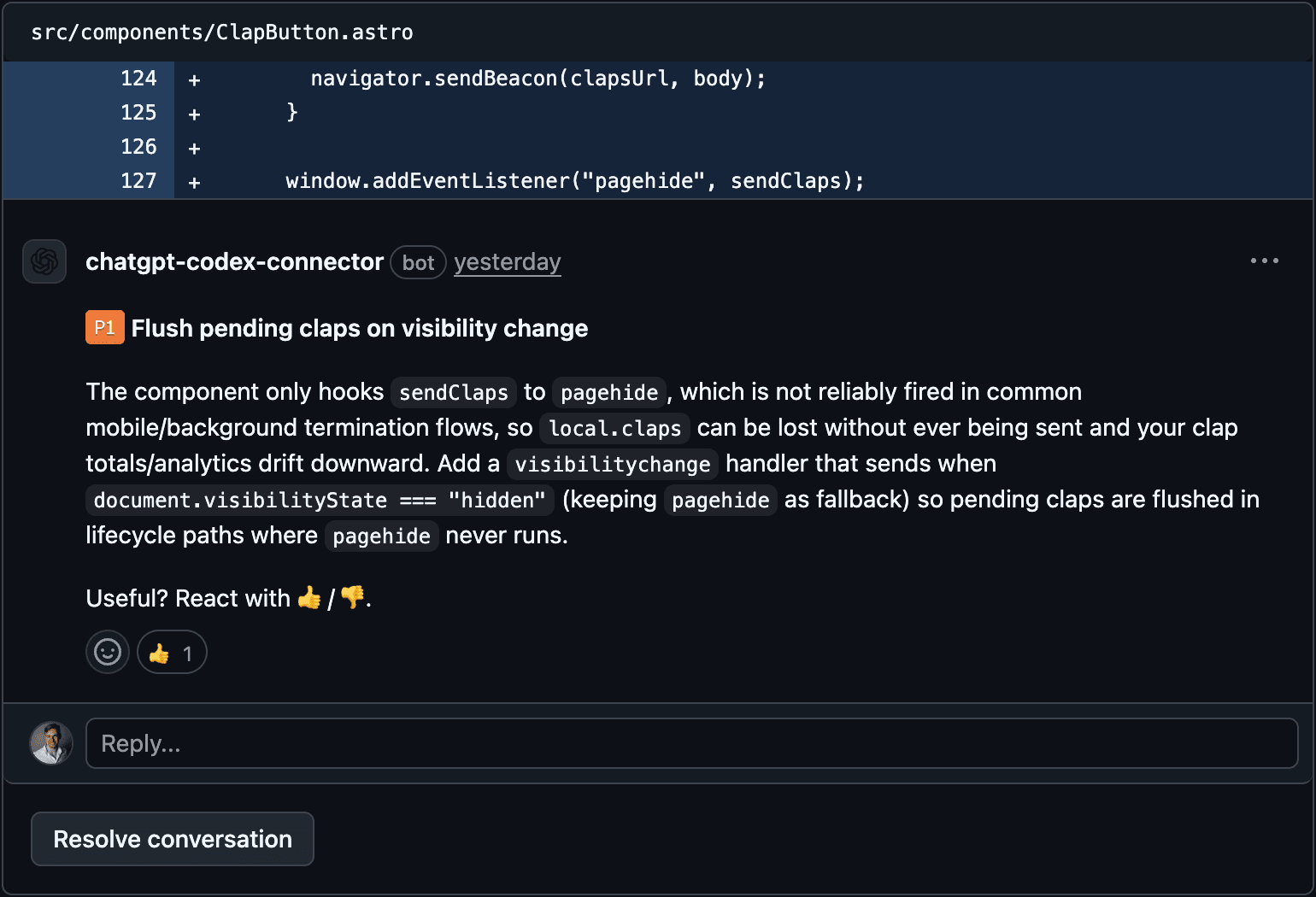
Adding a second listener wasn't enough: both could fire in the same session, sending claps twice. The fix: replace a boolean wasSent flag with a counter.
const local = { claps: 0, sentClaps: 0 };
// sendClaps:
const toSend = local.claps - local.sentClaps;
if (toSend <= 0) return;
local.sentClaps = local.claps;
const body = new Blob([JSON.stringify({ claps: toSend })], { type: "text/plain" });
navigator.sendBeacon(clapsUrl, body);
Now both pagehide and visibilitychange can fire safely. Each one sends only the applause that hasn’t been sent yet.
Conclusion
The most important lessons to be learned from the process of developing this solution are:
Pre-development research: the most valuable output isn’t always the code, but rather a map of solutions and their trade-offs. The most valuable output from Plan V1 wasn't code, it was a map of existing solutions. applause-button got rejected, but its API became the blueprint for ours.
The precision of the prompt determines the precision of the output: use the (What, Why, and How) method to clearly define your requirements, as this is key to ensuring the agent delivers exactly what you expect.
Agents in code review: Use code review agents – it costs nothing and will help you easily improve the quality of the code in your repository. A code review agent looks at the code from a different perspective than the agent you’re conversing with and focuses on what’s relevant to its context.